
Ask AI & Markdown rendering
Enable LLMs and AI agents to access your doc portal using Bump.sh AI features. When enabled, your documentation are made accessible through an MCP server and offered as Markdown pages, so AI assistants and agents can search, navigate, and read your doc portal.
Enable Ask AI #
Ask AI can be enabled or disabled from your documentation or hub settings, under the “Ask AI” section.
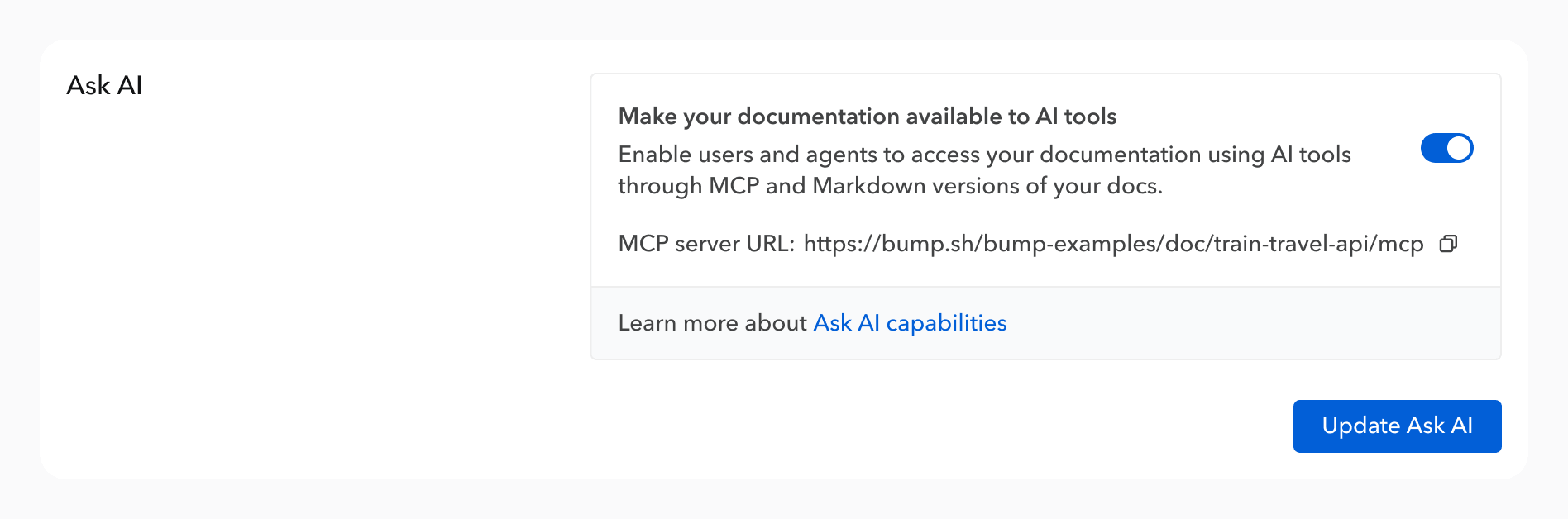
Enabling these capabilities:
- Exposes an MCP server for the API doc/hub, available by adding
/mcpat the end of the URL. - Makes every page available as Markdown (by appending
.mdto any URL). - Generates a llms.txt file at the root of your documentation.
Ask AI dropdown #
Many API consumers now rely on AI tools to help them quickly discover API capabilities. The Ask AI dropdown menu offers documentation users a way to either add the doc MCP server, open the current page in Claude/ChatGPT, or access the Markdown version.

Available options:
| Option | Description |
|---|---|
| Add to Cursor | Adds the doc/hub MCP server to Cursor in one click. |
| Add to VS Code | Adds the doc/hub MCP server to VS Code in one click. |
| Add to other AI tools (MCP) | Shows the MCP server URL and a ready-to-use mcp.json snippet. |
| Open in ChatGPT | Opens the current page in ChatGPT with the right Markdown page pre-linked. |
| Open in Claude | Opens the current page in ChatGPT with the right Markdown page pre-linked. |
| View as Markdown | Opens the Markdown version of the current page. |
| Copy as Markdown | Copies the Markdown content of the current page to the clipboard. |
MCP server #
When Ask AI is enabled, Bump.sh exposes an MCP server for your doc/hub. AI agents can use it to search, navigate, and read your API documentation programmatically, without having to scrape HTML pages or parse raw OpenAPI files. As search results are computed on our side, based on your documentation, it reduces the risk of AI hallucinations: the AI should just output information provided by the MCP server.
The MCP server URL is shown in your doc/hub settings and accessible from the Ask AI dropdown.
Docs MCP servers are currently only available for public API docs/hubs. Support for private doc portals coming soon.
Add the MCP server to your AI tool #
The “Ask AI” dropdown in your API docs/hubs provides a one-click setup for Cursor and VS Code. The MCP server URL is available by clicking the “Add to other AI tools (MCP)” section.
If it’s your first time adding an MCP server in your AI tool, check our tutorial covering major AI tools.
Available tools #
The MCP server exposes three tools:
| Tool | Description |
|---|---|
| search | Searches across all documentation pages by keyword. Supports filtering by type (operation, schema, topic, authentication, webhook, etc.). Returns up to 20 matching results with their URL, title, type, and a text excerpt. |
| get_pages | Retrieves the full content of one or more pages by their URLs. Accepts up to 10 URLs per request. Use this when you already know which pages you need, for example from search or list_pages results. |
| list_pages | Lists all child pages under a given URL in the documentation hierarchy. Returns each page’s URL, title, type, and description. Useful as a starting point to explore what documentation is available before fetching specific pages. |
A typical request from an API user to the LLM, like “How do I do that using this API” will trigger the search tool to get the right API/operation, and then a get_pages to get the actual content.
Markdown rendering #
Every page of your documentation is available as Markdown by appending .md to its URL. Markdown versions strip the surrounding UI, providing leaner context for AI tools and reducing token costs.
To access the Markdown version of a documentation, add .md at the end of the URL (or /source.md if you have a custom domain, when the URL is the root of your documentation).
On a documentation root (example truncated for visibility purposes).
# Bump.sh Api

## Description
This is version `1.0` of this API documentation. Last update on Jun 16, 2025.
This is the official Bump.sh API documentation. Obviously created with Bump.sh.

The Bump.sh API is a REST API. It enables you to [...]


## Servers
- https://bump.sh/api/v1: https://bump.sh/api/v1 ()


## Endpoints
- [Branches](https://developers.bump.sh/group/endpoint-branches.md)
- [Diffs](https://developers.bump.sh/group/endpoint-diffs.md)
- [...]


## Webhooks
- [Documentation change](https://developers.bump.sh/group/webhook-documentation-change.md)
For a specific operation (example truncated for visibility purposes).
# Create a new version

**POST /versions**

Deploy a new version for a given documentation, which will become the current version.


## Servers
- https://bump.sh/api/v1: https://bump.sh/api/v1 ()


## Authentication methods
- Authorization token
- Basic token


## Body parameters
Content-type: application/json
The version creation request object
- **documentation** (string)
  UUID or slug of the documentation.
- [...]

## Responses
### 201: Documentation version successfully created

#### Body Parameters: application/json (object)
- **id** (string)
  Unique id of your version.
- [...]